The Browser Wars are Back
This month I’m looking at Browsers – what are the advantages and benefits? Space is an issue so I’ll be brief on this growing topic.
What is a Browser – it is the software you use to access the Internet – Many people wrongly assume that computers come with access to the internet included, that’s not quite right and you do have a choice about how you access the internet. Equally the same is true with Mobile Phones – you need a browser to see a website.
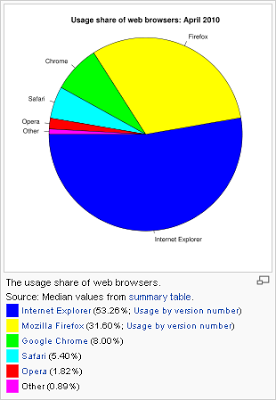
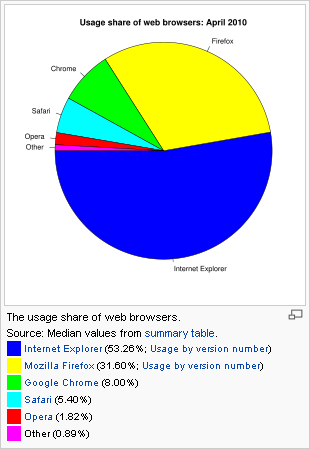
Internet Explorer: retains about 60% of the market share and comes by default on most computers (Microsoft), it works, it’s convenient and it’s easy. Can’t say more than that – but sadly it does get more complicated.
There are various versions from IE6, IE7, IE8 and very shortly IE9 and this demonstrates very adeptly the problems software companies have in getting us to upgrade our computers (10% of people still use IE6). However much we think we want the latest this and that, the reality is most people don’t like change.
Internet Explorer also has other issues, namely it lacks standards – to keep the Internet open, free and accessible to all, standards have grown up, except Microsoft has gone off in its own direction. However IE9 should be an improvement, but with IE7 and IE8 Microsoft many websites simply do not work, or are liable to appear wrong.
As a final note on Internet Explorer – the EU has ruled Microsoft anti-competitive to have IE as the default de facto browser on a computer and as such every user in Europe will now see Windows giving users a choice of browser when they buy a new computer or upgrade their old one. This recent development has yet to impact Internet Explorers share of the market but we can expect to see a lot of people move away and switch to better Browsers in the future.
The Browser Wars are definitely back.
Firefox: This is the browser that gave people choice once again after a period of dominance by Internet Explorer. Firefox has about 20% of the market share now and their main selling points are speed, standard compliance, and reliability.
From a users point of view it does some other things better as well. It upgrades incrementally, rather than switching in one go from IE7 to IE 8 and soon to IE9 which are big choices, Firefox upgrades automatically (with your permission) in the background and you hardly notice the change.
It’s easier on the eye as well, and it can store passwords and remember things you want it to with better control.
The killer point though is that you can install extensions and there are hundreds of them… If you’re looking to get jobs done faster then there is almost certainly a tool for it. It’s a bit like having an App on your iPhone.
Internet Explorer is using Firefox as the standard and we ourselves say ‘Design a website for Firefox and fix it for Internet Explorer’.
Chrome: This is Google’s entry to the Browser War – Google were frustrated on two accounts, a) financially (all browsers make money) and b) when using their own website. Due to this frustrating Google produced a browser that does some things very differently.
If you use a ‘complicated’ website like Facebook that uses a lot of technology like JavaScript, Ajax, Ruby on Rails or perhaps you want to edit spreadsheets, word documents online or to access email online through Hotmail, Gmail and so on. Then Google Chrome will do this very fast. Google Chrome is about speed first.
It also tackles reliability – if Firefox or Internet Explorer crash then your whole internet crashes. They try to remember what you were doing but often it’s not enough. With Google Chrome each window is separate and if one crashes the other all keep working. It’s that simple – if it crashes you only lose the bit that actually crashes.
Chrome now accounts of 6% of the market and it is the fastest growing Browser today.
Safari: Apple have always given preference to their Safari Browser on Macs, but they have also released a version of safari for Windows – so now it will run on any computer and it’s perfectly good. It’s a little down to personal preference though, Internet Explorer is probably what you are used to, Firefox or Chrome both good runners up and then Apple’s Safari and a few others come in after that.
If you have an iPhone then it will be running Safari, Apple don’t allow anyone else to compete on the iPhone. The other area that Safari suffers is that for some website they restrict Flash websites, so you cannot watch the YouTube website on the iPhone for example, instead you have to use the YouTube App for that.
Following on and as a closing statement on this longer than expect post – there are other Browsers such as Opera which are excellent – they make truly good backups to the main three and also can be refreshing as they approach the same job from different angles.
What do we recommend? – Well – a mixture of the three big browsers. Internet Explorer allows us to see what everyone else sees, Firefox provides the standards based experience that allows us to develop a decent website, while Chrome is an excellent way to manage Google Adwords, Email and other online ‘work’ rather than plain old fashioned browsing.
Ultimately – you’d do worst than have all three loaded on your computer and swap from time to time. What is important though is that you know you have a choice and use it. You need to see and know how other people are seeing your website.